
Legal
SMS terms
Last updated 7 September 2026. Written to be read, not to be survived.
On this page
All policies
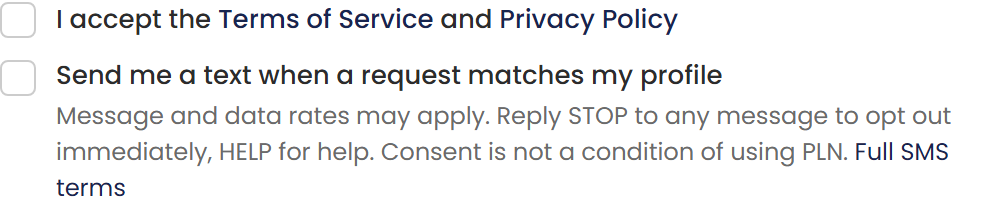
The opt-in, as users see it
The sign-up consent, verbatim. Notification settings shows the same disclosures when a signed-in user adds a mobile number; that screen is pictured at /legal/sms-opt-in-settings.png.
01Consent
PLN sends text messages only to numbers whose owner has expressly opted in, and keeps a record of each consent: the number, the wording shown, and when and where it was accepted.
Opting in is never required to use PLN, and consent to receive texts is never a condition of any purchase or service. Every alert that can arrive by text can also arrive by email or in the app.
Phone numbers and SMS opt-in data are never sold, and never shared with third parties or affiliates for their marketing or promotional purposes.
02How consent is collected
In two places, both inside the product and both requiring a deliberate, unchecked-by-default checkbox: on the account sign-up form (“Send me a text when a request matches my profile”, shown alongside the consent wording pictured on this page), and in Notification settings, where a signed-in user adds their mobile number and checks “I agree to receive text alerts.”
Both surfaces display the consent wording verbatim — message types, message frequency varies, message and data rates may apply, reply STOP to opt out, reply HELP for help — and link to this page, the Privacy Policy and the Terms of Service. The screenshot below shows the sign-up consent exactly as a user sees it.
03What we send
Operational alerts about your own work on PLN: new requests that match your profile, quote outcomes, job changes, document expiry warnings, team invitations, and billing problems. During a declared catastrophe event, matching requests may arrive around the clock.
PLN does not send marketing by text.
04Frequency, rates and quiet hours
Message frequency varies with your activity and settings. Message and data rates may apply and are charged by your carrier, not PLN.
You can set quiet hours in your notification settings. Urgent alerts you have chosen to receive — a new matching request during a catastrophe, for example — ignore quiet hours by design.
05STOP and HELP
Reply STOP to any message to opt out immediately; it takes effect before the next message is sent, and a final confirmation may be sent as allowed by carrier rules. Reply HELP for help, or write to support@propertylossnetwork.com.
Opting back in requires the same explicit consent as the first time.
06Carriers
Carriers are not liable for delayed or undelivered messages.
Superseded versions are kept and available on request — support@propertylossnetwork.com.